360° product views in render quality
Let the customer turn the product on your product page. Every angle is a finished render, and every colourway turns from the same camera.
A 360° product view lets a customer drag the piece round on your product page instead of guessing from four photos. Ours are built from finished renders rather than a live 3D model, so every angle keeps the light, fabric and shadow of your catalogue images. The sofa here is 205 renders, and on a 4G phone it starts turning half a second after the page opens.
Last updated
- →Every angle is a finished render, not a model drawn by the phone
- →A new colourway is a re-render of the same views, not another shoot
- →A photo shows first; the piece turns within two seconds even on 3G
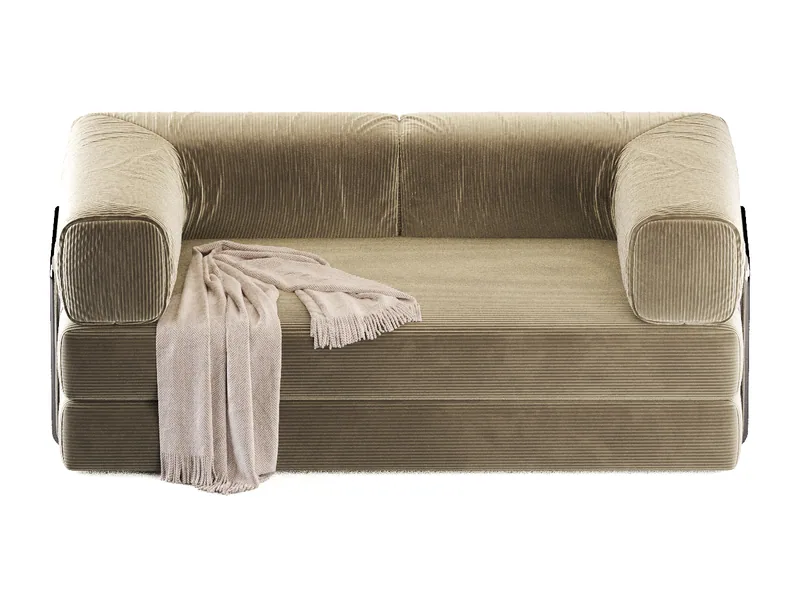
Drag in any direction
ColourwayOat
Demo sofa, 205 renders: 41 turns at 5 heightsMeasure it on your phone→
01What is a 360° product view?
A set of images round the product that the customer turns by dragging. Ours are renders, not photos or a live 3D model
+
What is a 360° product view?
A set of images round the product that the customer turns by dragging. Ours are renders, not photos or a live 3D model
A 360° product view is a set of images taken round a product, which the page swaps as the customer drags, so the piece turns under their hand. It is also called a 360 spin, a product spin or a 360 product viewer. The experience is the same.
There are three ways to make the images. A photographer shoots the product on a turntable. A 3D model is sent to the browser, and the customer's phone draws it live. Or every angle is rendered in advance, in the same quality as your catalogue images. We do the third.
The sofa at the top of this page is 205 renders: 41 turns across the front at 5 camera heights, covering 80° of turn and 20° of height. One camera in 3ds Max moves round the piece on a sphere and renders each angle with a depth pass. Between two renders the page does not jump or cross-fade: it uses that depth to turn the nearest render the last degree or two, so the motion is continuous, and wherever the customer stops, they are looking at a render.
The sofa is a demo piece rendered for this page, not a product we sell. The views are built for furniture and lighting brands that sell one piece in several fabrics or finishes, and for the studios that build their stores. If you need the turn as a short video rather than under the customer's hand, the same model renders as a 360° turntable on white; a custom furniture studio in New York has ordered those from us for over a year.
02Is it cheaper than 360° product photography?
A 360° shoot runs $150–500 per item in the US and starts again for each fabric. Here a new colourway is one more render
+
Is it cheaper than 360° product photography?
A 360° shoot runs $150–500 per item in the US and starts again for each fabric. Here a new colourway is one more render
For a collection sold in several fabrics, usually yes. Lars Miller Media's 2026 US price guide puts 360° product photography at $150–500 per item, and the shoot repeats for every colourway, because each one is a different physical sample on the turntable.
With rendering, a colourway is a material change on the same model, rendered from the same camera positions, so the new fabric turns exactly like the first. On this sofa that is about a quarter of an hour of rendering for the 41 views of a turn, and about 80 minutes for the 205 views of turn and tilt.
Photography still wins for one product in one finish that already exists and fits on a tabletop turntable. A sofa does not fit on one, and on a new collection the fabrics are often swatches before they are finished sofas.
Home Studio List puts US studio day rates for 360° work at about $1,500–1,600, before the sofa has been shipped to the studio and back.
03Rendered 360° views or a 3D model viewer (GLB)?
A 3D model turns all the way round and goes into the customer's room. Rendered views keep the finished light and fabric
+
Rendered 360° views or a 3D model viewer (GLB)?
A 3D model turns all the way round and goes into the customer's room. Rendered views keep the finished light and fabric
Choose by what has to sell the product. A 3D model viewer shows a GLB file that the customer's phone draws in real time: any angle, and on phones that support it, the piece placed in their own room (AR). Rendered views show the finished render, with your light, materials and shadows, across the range you choose, up to a full turn.
Before building this viewer we tried two other ways on the same sofa: a live 3D model, and a Gaussian splat built from the renders. Both turned smoothly. On both, the corduroy went soft. For a product sold on its fabric, that was the wrong trade.
Where the room view matters, use a model. Where the picture has to sell the product, use the render. If the customer needs to change the product rather than turn it, swapping frames, timbers or sizes, that is a configurator.
| Rendered 360° views | 3D model viewer (GLB) | |
|---|---|---|
| What the customer sees | The finished render: your light, materials and shadows | The model drawn live, with simpler light and materials |
| Angles | Any range up to a full turn; on this sofa the front 80°, kept short for speed | Any angle, all the way round |
| In the customer's room (AR) | No | Yes, on phones that support it |
| On a weak phone or connection | A photo first, turning within seconds | Depends on the model's weight and the phone |
| A new colourway | One more render of the same views | A new material on the model |
04Turn, or turn and tilt?
Turn: 41 renders, 1.2 MB on a phone, for the whole catalogue. Turn and tilt: 205 renders, 6.2 MB, for the lead pieces
+
Turn, or turn and tilt?
Turn: 41 renders, 1.2 MB on a phone, for the whole catalogue. Turn and tilt: 205 renders, 6.2 MB, for the lead pieces
Turn is for every product in the catalogue. The customer swings the piece left and right and sees the arm, the back and the depth of the seat, the views a flat photo leaves out. On this sofa that is 41 renders, 2° apart, and 1.2 MB on a phone.
Turn and tilt is for the pieces a collection leads with. The camera also rises and falls, so the customer looks down into the seat and along the arms the way a showroom visit would let them. That is 205 renders, 41 turns at 5 heights, and 6.2 MB on a phone.
How far the view turns is a choice as well. A full 360° turn shows the back of the piece too, but at the same 2° spacing it is 180 renders instead of 41, more than four times as many to download, so it takes longer to load. A front arc like this sofa's keeps the page fastest. We set the range with you, product by product, depending on whether the full turn or the speed matters more.
On a phone the sideways turn loads first, since that is the turn people make, and the heights follow. The difference between the options is weight and render time, not the quality of a single frame.
Drag sideways to turn
ColourwayOat
05Will a 360° viewer slow down the product page?
Not if the viewer loads in the right order. A 50 KB photo shows first; on a 4G phone the sofa turns at 0.5 s, on 3G at 1.9 s
+
Will a 360° viewer slow down the product page?
Not if the viewer loads in the right order. A 50 KB photo shows first; on a 4G phone the sofa turns at 0.5 s, on 3G at 1.9 s
Not if the viewer loads in the right order. A single photo of about 50 KB is on screen before anything else, the opening render travels on its own, and the rest arrives behind the customer's hand, the angles they are heading for first.
Nothing loads until the viewer comes near the screen, so a visitor who never scrolls to it pays nothing for it. With Data Saver on, only the light set loads, and it still turns all the way. On an older browser without the graphics support it needs, the photo stays and the page is complete.
A phone gets smaller frames, 800 px wide and about 25 KB each as AVIF, and keeps only the few around the current angle unpacked: a few dozen megabytes of memory, well inside what a phone browser allows a page.
| Device and connection | Photo on screen | Turns | First set |
|---|---|---|---|
| Phone, 3G (1.5 Mbit/s) | 1.8 s | 1.9 s | 12 s |
| Phone, 4G (10 Mbit/s) | 0.4 s | 0.5 s | 2.1 s |
| Computer, 4G (10 Mbit/s) | 0.3 s | 0.7 s | 2.9 s |
06Does every colourway turn from the same angle?
Yes. Switch the fabric mid-turn and the sofa stays exactly where the customer left it
+
Does every colourway turn from the same angle?
Yes. Switch the fabric mid-turn and the sofa stays exactly where the customer left it
Yes, to the pixel. Every colourway is rendered from the same camera positions, so the customer can stop at an angle, switch from Oat to Sage, and see the new fabric from exactly the same view.
A photo shoot cannot hold the angle across colourways like that. Each sample goes on the turntable separately, and across a day or a season the camera, the light and the crop drift. A rendered catalogue does not drift: the piece launched next year turns exactly like the one launched today.
Rendering from one camera also covers states a photograph needs a second session for, such as a lamp lit and unlit, matched to the pixel.
07How does the viewer get onto your store?
Our web team, Umberform, builds it into your product pages and tests it on real phones before launch
+
How does the viewer get onto your store?
Our web team, Umberform, builds it into your product pages and tests it on real phones before launch
Umberform, the web studio from the founders of Render Friends, puts the viewer on your product pages with your colourways and tests it on real phones before it goes live. The views we render are the views your customers get.
Putting the viewer on your store is integration work, not a plugin you install. How much of it there is depends on how your product pages and variants are built, which is why it starts with a look at your current site rather than a fixed price.
08What do you need from us to start?
One 3D model per product. If there is none yet, we build it from CAD files, drawings or photos of a sample
+
What do you need from us to start?
One 3D model per product. If there is none yet, we build it from CAD files, drawings or photos of a sample
One 3D model per product. The views are rendered from it, so if we have already modelled your catalogue for stills, the 360° views need no second modelling bill.
If there is no model yet, we build it from CAD files, technical drawings or photos of a sample. Every colourway after that is one more render of the same views.
09When is a 360° view not worth it?
One product, one finish, a simple shape: good stills do the job
+
When is a 360° view not worth it?
One product, one finish, a simple shape: good stills do the job
When the product is simple and sold in one finish. A cushion, a rug or a plain side table reads fully from three or four stills, and the budget does more as extra lifestyle scenes.
When the customer needs to see the piece in their own room, a 3D model with AR does what rendered views cannot. When they need to change it, a configurator does. We will tell you which one your catalogue needs, including when it is none of them.
Example projects
View all projects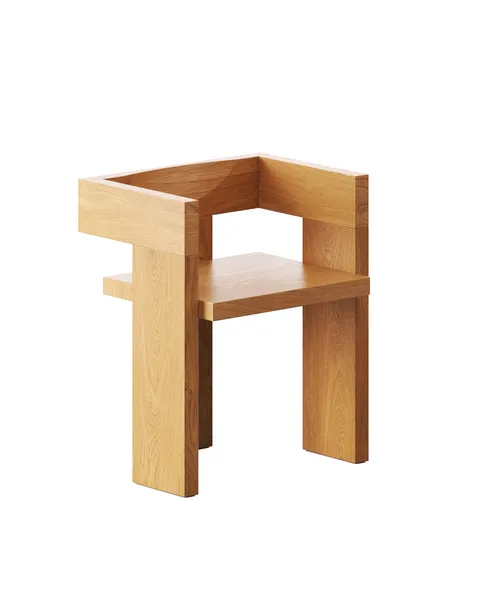
USA
Chairs & Armchairs — 3D Modeling Reel
Picked from several projects — most for one New York studio

Germany
Table & Floor Lamps — 3D Modeling Reel
Several lighting projects, most for one German maker
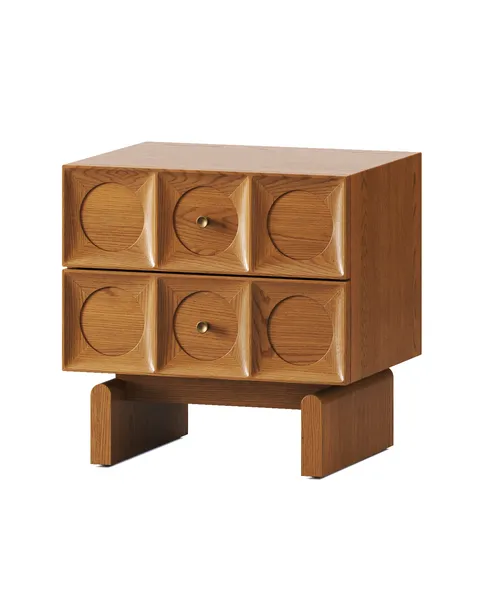
USA
Coffee Tables & Nightstands — 3D Modeling Reel
The best of several furniture projects, shown as one set
Behind this service

Five years in architecture before he moved into visualization in 2018, and the founder of the studio since 2022. Oleg sets the direction, takes on the projects nobody is sure can be done yet, and still reviews the work that goes out the door.
Oleg Kniaziev, CEO / Founder
What affects your quote
- →Number of scenes or camera angles you need
- →Complexity of the model and materials
- →How many revision rounds you use
- →Standard timeline versus a rush turnaround
We assess each project on its own merits rather than a flat rate — as a rule, the more images you order in one project, the lower the cost per image. Send us a brief description and we'll respond with an estimated cost.
Common questions
Still deciding? Send your product list with whatever reference you have and we will come back with a scope, a timeline and an estimated cost before anything is committed.
Get an estimate→Is a 360° product view the same as a 3D model viewer?+
No. A 3D model viewer sends a model to the browser and the phone draws it in real time, so it can turn all the way round and show the piece in the customer's room. A 360° view built from renders shows finished images, so it keeps the render's light and fabric but shows only the angles that were rendered: up to a full turn, or, on the sofa on this page, the front 80° and 20° of height, which keeps it fast.
Can a 360° product view turn all the way round?+
Yes. The sofa on this page turns through its front 80° because that keeps it light: 41 renders and 1.2 MB on a phone. A full turn at the same 2° spacing is 180 renders, more than four times as many to download, so it loads longer. Which one a product gets depends on whether you need the back of the piece or the fastest page.
How many images does a 360° product view need?+
As many as the range and the smoothness ask for. The sofa on this page uses 41 renders, 2° apart, to turn through 80°, and 205 renders to add 5 camera heights. Because the viewer turns each render the last degree using its depth, it moves smoothly between them rather than stepping.
Does a 360° product viewer work on mobile?+
Yes, phones are what it is built around. A phone gets smaller frames, the sideways turn loads first, and on a 4G connection the sofa turns half a second after the page opens. On 3G it turns in under two seconds, and a photo is on screen before that.
Can you make a 360° view of a product that has not been manufactured yet?+
Yes. The views are rendered from a 3D model, so the product only has to exist as CAD files or drawings. A collection can launch with 360° views before the first unit leaves the factory.
Can we start with one product?+
Yes. One product in two or three colourways is enough to put the viewer on your own product page and measure it on your customers' phones before you commit the catalogue.
Do you sign an NDA?+
Yes. We sign NDAs for every project and treat client files and unreleased products as fully confidential.